


Every reader on openseforim.org that is not taken from an existing digital text starts with OCR: a program looks at a photograph of a printed page and writes down the letters it sees. For Hebrew I use Kraken, a free, open-source OCR engine written by Benjamin Kiessling, now at Inria in Paris, and best known as the engine behind eScriptorium, the transcription platform used by many manuscript projects. With it I run one ready-made model, PP-OCRv6, which its author trained on many scripts, Hebrew among them.
My upcoming post on the Bochart reader will describe how Kraken read Syriac there, where the AI vision models failed; this one is about printed Hebrew. In the past week I ran Kraken on five Hebrew books, from Emden’s memoir to the Ḥida’s travel diary and two classics of nineteenth-century Talmud scholarship, Weiss’s Dor Dor ve-Dorshav and Frankel’s Darkhe ha-Mishnah. Here’s what I learned, with numbers.
The scan matters more than the engine
The clearest lesson came from the Ḥida’s Ma’agal Tov. I had two scans of it. The first is of A. Freimann’s complete edition (1921–34), the copy on HebrewBooks: black and white, about 300 dots per inch, the letter edges ragged. The second is of a partial printing of 1885, photographed by the University of Illinois for the Internet Archive in colour at 650 dots per inch.
Screenshot of the same diary in two scans: Freimann’s edition from HebrewBooks (above) and the 1885 printing from the Internet Archive (below):
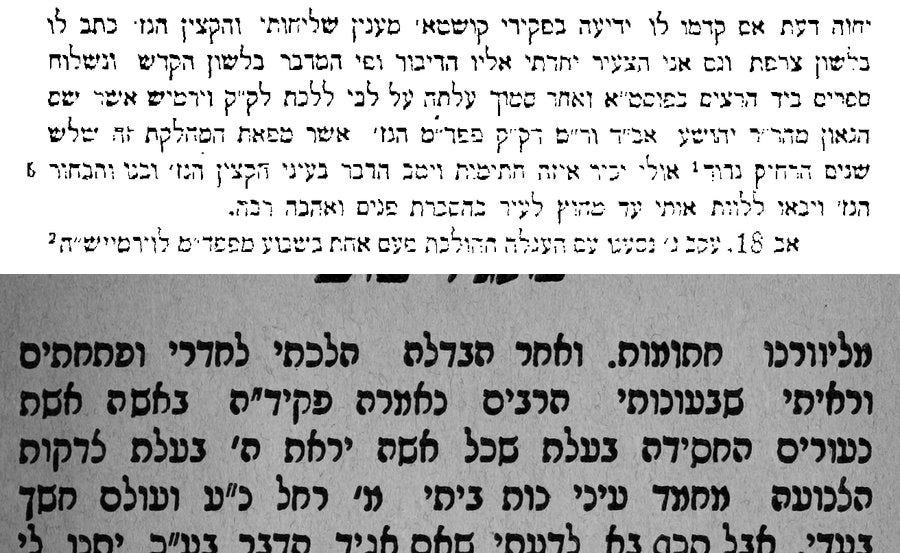
On one page of the Freimann scan, which I transcribed by hand to have a measure, Kraken got 26.5 percent of the words wrong. The errors were not random: this typeface’s ג looked to the model like נ, its פ like ס, its ב like כ, so מעגל came out מענל and בפקידי came out בסקירי. Tesseract, the other common free engine, did worse on the same page, at 40 percent. I tried enlarging and smoothing the images; the errors changed places but did not go down.
On the 1885 printing, which is set in a Rashi-like cursive type that is harder to read for a human, Kraken did far better. I checked five pages line by line against the scan and changed 26 of 964 words, 2.7 percent, and that count includes the catchwords at the foot of each page, which I removed. Those five pages are now the first part of the Ma’agal Tov reader.
The practical rule I now follow: before committing to a book, read one page and count the errors. If the scan is poor, look for another scan before trying to improve the OCR.
Finding the lines
Kraken normally does two things: it finds the lines on the page, then reads each line. On the black-and-white Freimann pages the first step failed badly. It lost or broke about a third of the 35 lines on my test page, and some of what it did read came back as fragments of two lines run together.
Printed books are easier than manuscripts here: the lines are straight, evenly spaced and in one column. So I wrote a small line finder of my own. It adds up the black in each row of pixels, which gives a wave with one peak per line, finds the peaks at the line spacing, and cuts halfway between them. It also cuts off the line numbers that some editions print in the margin. Kraken then only reads the lines it is given. On the same page, every line came out whole.
Screenshot of the line finder’s boxes on a page of the Freimann edition, one box per printed line, the margin numbers left outside:
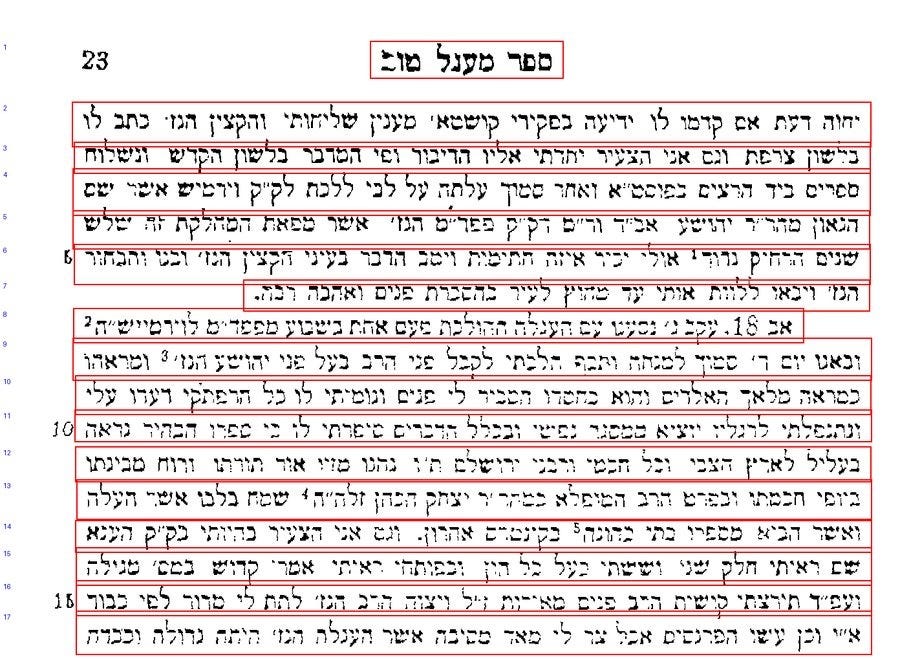
One more setting is especially important: telling Kraken the text runs right to left. Without it the program writes each line in the order the letters appear on screen, and my own code reversed them, which turned the year 18 into 81. With it, the text comes out in reading order with the numbers correct.
Five prints
Jacob Emden, Megillat Sefer (Warsaw 1896, Gershom Scholem’s copy). One to three real errors a page. The noise was elsewhere: running heads, page numbers, and Scholem’s pen marks in the margins, which the OCR reads as letters.
Ḥida, Ma’agal Tov (Przemyśl 1885). About 2.7 percent of words changed. Typical errors: the cursive צ read as ל, so צדקה became לדקה, and now and then the first or last word of a line lost.
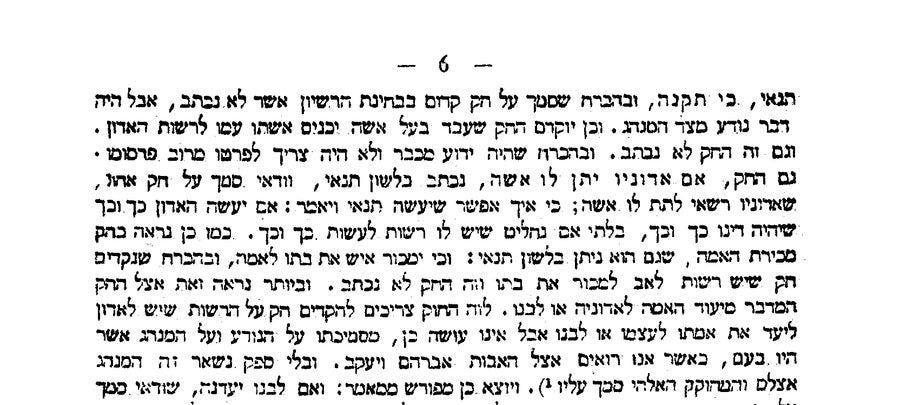
I. H. Weiss, Dor Dor ve-Dorshav (the scans of the Daat library, black and white). About one wrong letter a line on my test page, almost always a look-alike pair: ב and כ, ח and ה. The Daat PDFs carry their own hidden text from an older Hebrew OCR program, but it is unusable: every word is reversed and the word order is scrambled.
Screenshot of a page of Weiss, Dor Dor ve-Dorshav, vol. 1, from the Daat scan:
Zacharias Frankel, Mevo ha-Yerushalmi (Breslau 1870, the Potsdam university library’s scan). A low resolution, about 160 dots per inch, but in colour and sharp: about four doubtful words in 39 lines, once the images were enlarged and the dark book edges cut off.
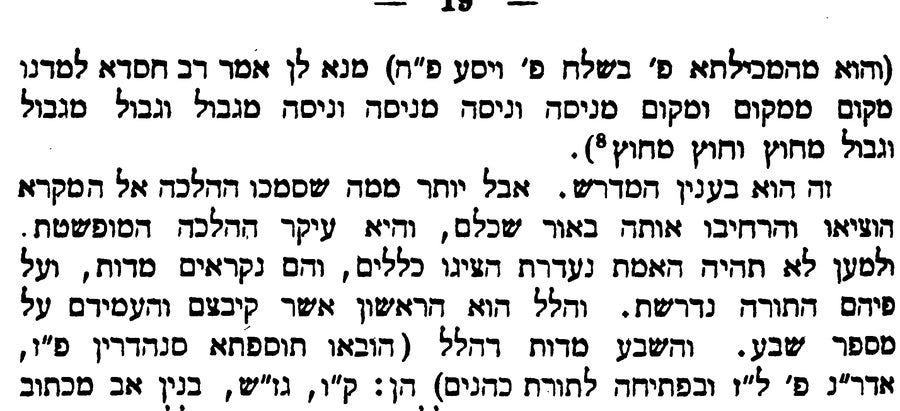
Zacharias Frankel, Darkhe ha-Mishnah (Leipzig 1859, Harvard’s copy on HathiTrust). A high-resolution scan, read at half size. I found no errors in the main text of my test page; the footnotes, in a smaller type, confuse ו and ז.
Screenshot of Darkhe ha-Mishnah, page 19, the section on Hillel’s seven rules:
For Syriac I use the same engine with other models, made by Beth Mardutho, the Syriac Institute; the Barhebraeus reader shows the result, with 95 percent of words matching a second printing of the same passage.
Checking
OCR output is a draft. Every page I publish as checked was compared with the scan line by line, and the reader shows the scan beside the text so that anyone can do the same.
Speed
On my laptop Kraken reads about one and a half seconds per line, so a page of Weiss, with 42 lines, takes about a minute. One volume of 250 pages takes four hours or more. That is fine overnight, but the books waiting in the queue would take days.
So I tried a free graphics card. Kaggle, the data-science site owned by Google, lets anyone run notebooks on its cloud GPUs for about 30 hours a week. On one of its cards Kraken read 6.3 lines a second, about nine times the laptop’s speed, and all 1,787 lines of the 50-page test came out exactly as on the laptop. The rest of Weiss and both Frankel works, about 2,100 pages, are now packed for a run there.
Notes/Qualifications
The error rates above come from one to five pages per book, not from a benchmark, and the unchecked OCR in the projects’ files is marked as such.
It does not rescue a poor scan. The Freimann edition of Ma’agal Tov is still the only complete text of the diary, and its scan still gives one wrong word in four. Teaching the model this typeface on a few hundred corrected lines would probably help; I have not tried it yet, and on a GPU it has become cheap enough to try.
It is not set up for mixed scripts. The German works on my list, Bacher, Zunz and others, print Hebrew quotations inside German lines. One model reads one script at a time well, so those books need a second pass.
Kraken does not officially support Windows. It runs on my Windows laptop all the same, in its own Python environment, and it runs without trouble on Kaggle’s Linux machines.
Appendix - Technical
Engine and model. Kraken 7.1.1 (Python 3.12 virtual environment on Windows; on Kaggle, pip install kraken==7.1.1).
Recognition model: PP-OCRv6 medium (B. Kiessling, Zenodo 21788410, Apache-2.0, medium.safetensors, 64 MB).
Tested and dropped for print: the BiblIA and Italian manuscript models (they drop punctuation and gershayim).
Syriac: Beth Mardutho’s Qoruyo models (CC BY 4.0).
Lines. split_lines.py / split_image.py (in the openseforim/maagal-tov repository).
Ink mask by Otsu threshold (128 for 1-bit images, where Otsu is undefined); row profile smoothed over 7 px; line pitch from the first autocorrelation peak between 20 and 120 px; line centers = profile peaks at least 0.6 × pitch apart; cuts at the profile minimum between centers; bands thinner than 0.25 × pitch dropped (rules).
Margin numbers: where a line starts or ends more than 0.4 × line height outside the page’s median text edge, ink runs are skipped up to the first gap of 2 px or more, repeatedly (digits like “20” have gaps).
Optional paper crop (columns and rows with under 40 percent dark pixels) for scans with dark book edges; optional scaling (2× for the 160 dpi Potsdam scan, 0.5× for the 600 dpi HathiTrust scan). Kraken’s own baseline segmentation (segment -bl) lost about a third of the lines on the 1-bit Freimann pages.
Reading. kraken -i line.png line.txt ... ocr -m medium.safetensors --no-segmentation -B 16 --base-dir R, many line pairs per call so the model loads once.
--base-dir R gives logical order (digits correct); without it the output is visual order.
Measurement. Word error rate against a hand transcription of Freimann scan 30 (35 lines; 446 scored words, uncertain words excluded):
Kraken 26.5 percent at native size, 26.7 percent at 2× with smoothing; Tesseract 5 heb (tessdata_best, --psm 6) 44.8 and 40.4 percent.
1885 printing: word-level difference between raw OCR and the checked text of scans 8–12 (image-file numbers): 26 of 964 words.
Speed. Laptop (12 logical cores, --threads 8–10): about 1.5 s per line, measured over runs of 40 to 3,860 lines; one OCR job at a time, since parallel jobs only competed for the cores.
Kaggle: Tesla T4, --device cuda:0 --precision 16-mixed -B 64: 1,787 lines in 282.8 s including model loading (6.3 lines/s); line splitting of the 50 pages 5.6 s on the CPU.
Output identical to the laptop’s (compare_gpu.py).
Kaggle needs pip uninstall -y transformers after installing Kraken 7.1.1: Kaggle’s transformers takes over the model loading and refuses the safetensors 0.7 that Kraken pins.
Batch. kaggle_batch.py: jobs in jobs.json (pages folder, scale, crop, minimum line height), line splitting in a process pool, chunks of whole pages (about 1,000 lines) dealt to one worker per GPU, progress lines with rate and time left, resumable (pages with a text file are skipped). Batch 1: 2,126 pages, 365 MB.